What it looks like to work in here.
Think through the work with the material beside you and the tools within reach.
Illustrative product views with fictional work. The controls explore the example.
01 · Your thinking has somewhere to go.
Most of my work happens in these conversations. I read the material beside them and leave comments where the thinking needs attention. Hover a work-item number and it becomes a task I recognize; click it and the source opens beside the conversation.
Sessions start with context about current principles and active work. Earlier decisions can be retrieved with their sources. Here, DL-7 sets the plan: prepare the campaign while another session checks checkout. My comment changes the draft’s opening request.
02 · Work through connected tools.
A session can use connected tools to act on your direction. Here, one updates the campaign sequence while another checks the path from cart to checkout.
You can inspect the updated sequence in the campaign tool and read the checkout findings in a local file. Each session edits the local files, editing the information each future session has access to.
03 · A little direction can carry the work forward.
On my phone, I can switch between the sessions running on my computer and continue the same conversations. Here, I use the comparison notes to redirect the opening. The session updates the campaign draft on my machine.
04 · Tasks laid out in a dashboard.
The board brings the plan and the sessions together. Threads are collections of tasks per related project. Each shows what recently happened and what is next.
At close, work done enters the local records. The next session has a clear starting point.
How the board gets its picture
Roadmaps supply the plan. Thread definitions connect the work; recorded session events and live activity show how it is moving. The board reads those sources together. Its send arrow puts a continuation prompt into an open session, ready for me to submit.
Processes
Processes is the gauge cluster underneath: running services, memory use, and the sessions I can resume. Both views help me find my way back into the work.
05 · Build the view you wish you had.
A customer built almost all of his CRM through conversations about how he wanted it to work. He shaped the interface and behavior in plain English. I helped him think through the infrastructure and added some wiring to populate it.
The example below shows that process: a request becomes a working view, and the CRM’s records become information a later session can use.
The shell and phone grew from wants of my own. You can develop the environment while you use it, building something useful when you discover what is missing.
See how I approach a custom build ↗
06 · Make this a place you can work in.
We start with work you need to do. I set up the environment with you, fit it to your documents and connected tools, and help you learn it by making something useful.
You leave with a working environment and experience shaping it. The next idea has somewhere to begin.
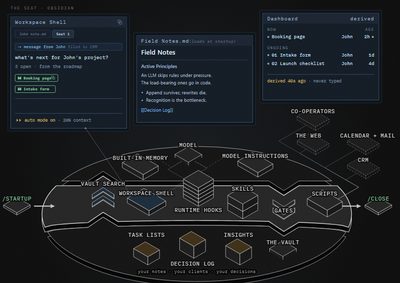 Curious about the intricacies?
The surfaces share a working record. Each layer gives that record another use.
Startup and retrieval bring working information into a session. Search indexes help find it; the source files remain the record.
Connected tools and reusable procedures let a conversation act on that information. What is connected depends on the work and the access you configure.
Close and review put outcomes back into the record and keep it useful. The dashboard can then show progress against the plan.